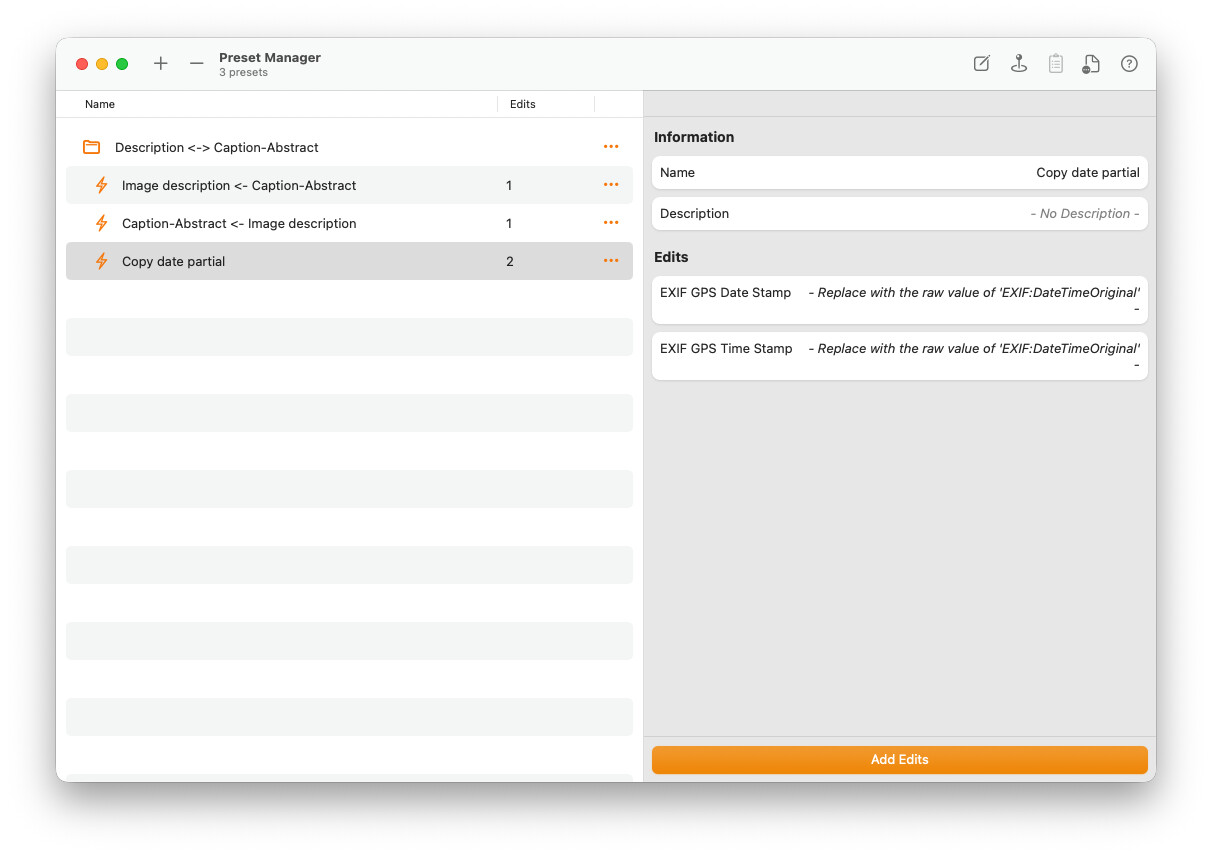
I have a bunch of photo’s and want to copy Exif DateTimeOriginal to the 2 tags GPS Date Stamp and GPS Time Stamp. I do not want to copy this one photo by another, but want to do it for all photos in the folder. Also, each photo has its own date/time. How can I to this tool?
Sorry for the delayed response!
Yes, it is possible to do this automatically for all photos in a folder. MetaImage allows you to use presets to copy the DateTimeOriginal value directly into other metadata fields, including GPS Date Stamp and GPS Time Stamp. When copying, the tool automatically extracts only the date part for GPS Date Stamp and only the time part for GPS Time Stamp.
To do this:
-
Select all the photos from your folder in MetaImage
-
Create a new preset (or edit an existing one)
-
Add two metadata actions:
-
Choose GPS Date Stamp and set up the preset to copy Exif DateTimeOriginal
-
Same thing for GPS Time Stamp
-
-
Apply the preset to all selected photos
Each image keeps its own original date and time, so everything is updated automatically in one batch.